There are hundreds of workout apps in 2026. Most of them are not worth your time.
Some are glorified rep counters. Others bury useful features behind paywalls and upsells. A few are genuinely great tools that help you train smarter, stay consistent, and make real progress.
This guide cuts through the noise. We tested and compared the best workout apps of 2026 across categories that actually matter: AI planning, exercise libraries, workout logging, progress tracking, pricing, and usability. Whether you want the best free workout app or a premium tool with deep personalization, you will find the right pick below.
Want a focused shortlist by category? We also publish dedicated deep-dives: the best free workout apps, the best AI workout apps, and the best workout tracking apps.
TL;DR
- Best overall AI workout planner: Load Muscle - 4,000+ exercises, AI-generated plans, free tier available.
- Best workout tracker: Strong - clean logging interface, great Apple Watch support.
- Best free option: Hevy - solid tracking and social features without paying.
- Every app on this list is worth trying. The best workout app is the one you will actually use consistently.
- For a deeper look at what features matter most, read our guide to fitness app features.
Quick-Pick Comparison Table
Before diving into the full reviews, here is a side-by-side snapshot of every app on this list.
| App | Price | Free Tier | Best For | Rating |
|---|---|---|---|---|
| Load Muscle | Free + Premium | Yes | AI workout planning | 4.8 / 5 |
| Strong | ~$5/mo | Limited | Workout tracking | 4.7 / 5 |
| Hevy | Free + Premium | Yes (generous) | Free tracking & social | 4.6 / 5 |
| JEFIT | Free + ~$7/mo | Yes (ads) | Bodybuilding | 4.5 / 5 |
| Fitbod | ~$15/mo | Trial only | Adaptive AI | 4.5 / 5 |
| Nike Training Club | Free + Premium | Partial | Home workouts | 4.6 / 5 |
| StrongLifts 5x5 | Free + Premium | Yes | Beginners | 4.6 / 5 |
| GZCL | Free / Varies | Varies | Powerlifting | 4.4 / 5 |
| Gymshark Training | Free + Premium | Partial | Community & challenges | 4.3 / 5 |
| Apple Fitness+ | ~$10/mo | No | Apple ecosystem | 4.7 / 5 |
| Caliber | Free + Premium | Yes | Strength coaching | 4.5 / 5 |
How We Evaluated Workout Apps
Not all workout apps solve the same problem. Some are built for tracking. Others focus on planning. A few try to do everything.
We evaluated each app across six criteria:
- Ease of use: How fast can you start a workout and log sets? If the UI fights you, it does not matter how many features it has.
- Exercise library: Does the app include enough exercises with clear demos? Can you find alternatives when equipment is unavailable?
- AI and personalization: Does the app build or adapt routines to your goals, schedule, and equipment? Or does it hand everyone the same template?
- Tracking and progress features: Can you see what you lifted last session? Does the app show trends over time?
- Pricing and value: What do you get for free? Is the premium tier worth it?
- Offline support: Does the app work without a connection? This matters more than most people think.
We also considered platform availability, community features, and how well each app handles different training styles (hypertrophy, strength, home workouts, etc.).
Top 11 Best Workout Apps (2026)
1. Load Muscle (Best AI Workout Planner)
Download App: Google Play| App Store
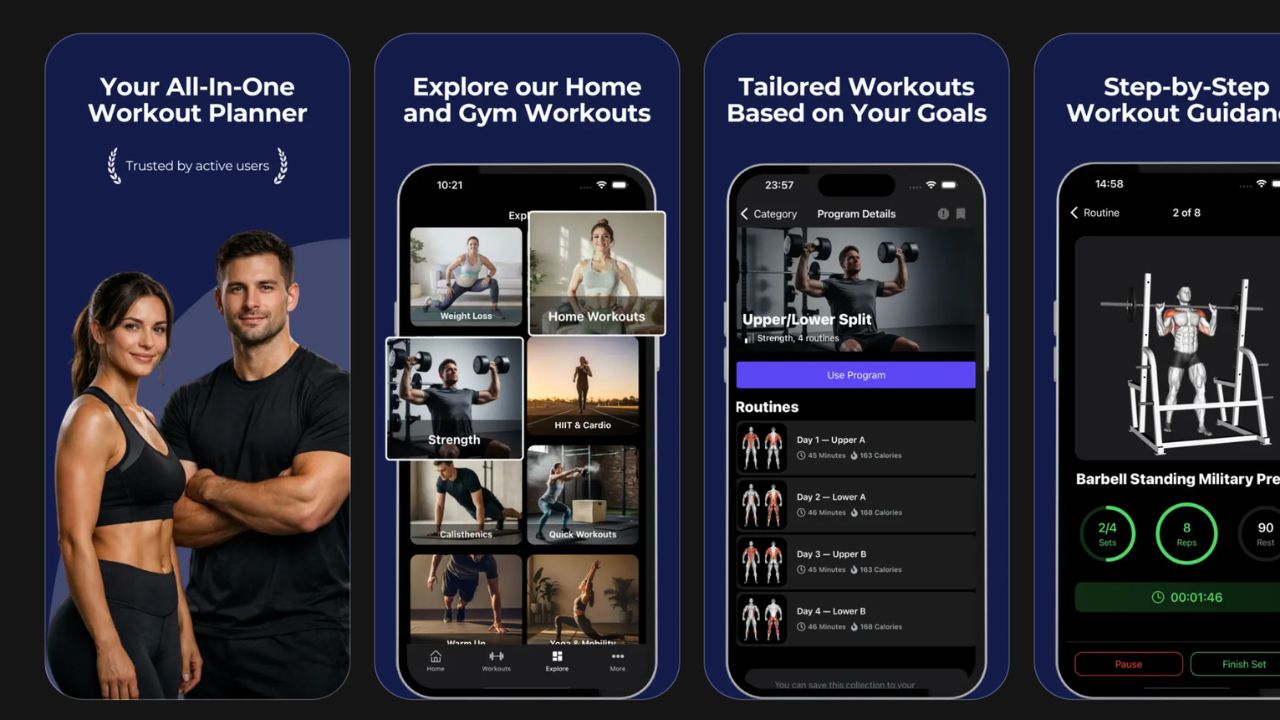
Load Muscle is an AI-powered workout planner and tracker built for people who want personalized programming without hiring a coach. You answer a few questions about your goals, experience level, available equipment, and schedule, and the AI generates a complete training plan drawn from a library of 4,000+ exercises.
Every exercise includes video demonstrations and muscle-targeting info, so you are never guessing about form. The app supports multiple training splits, adapts to home or gym setups, and offers a free plan that gives you access to the core planning and tracking features.
Best for: People who want AI-generated, personalized workout plans with a large exercise library.
Pros:
- AI planner builds custom routines based on your goals, equipment, and schedule
- 4,000+ exercises with video demos and detailed instructions
- Free plan available with full access to the workout planner
- Deep personalization that goes beyond basic templates
- Works for home, gym, and mixed setups
Cons:
- Newer app, so the community is still growing
- No live coaching or class-style workouts
- Advanced analytics are still expanding
Pricing: Free plan available. Premium plans for additional features.
If you want to understand how AI workout planning works under the hood, read our AI Workout Planner Guide.
2. Strong (Best Workout Tracker)
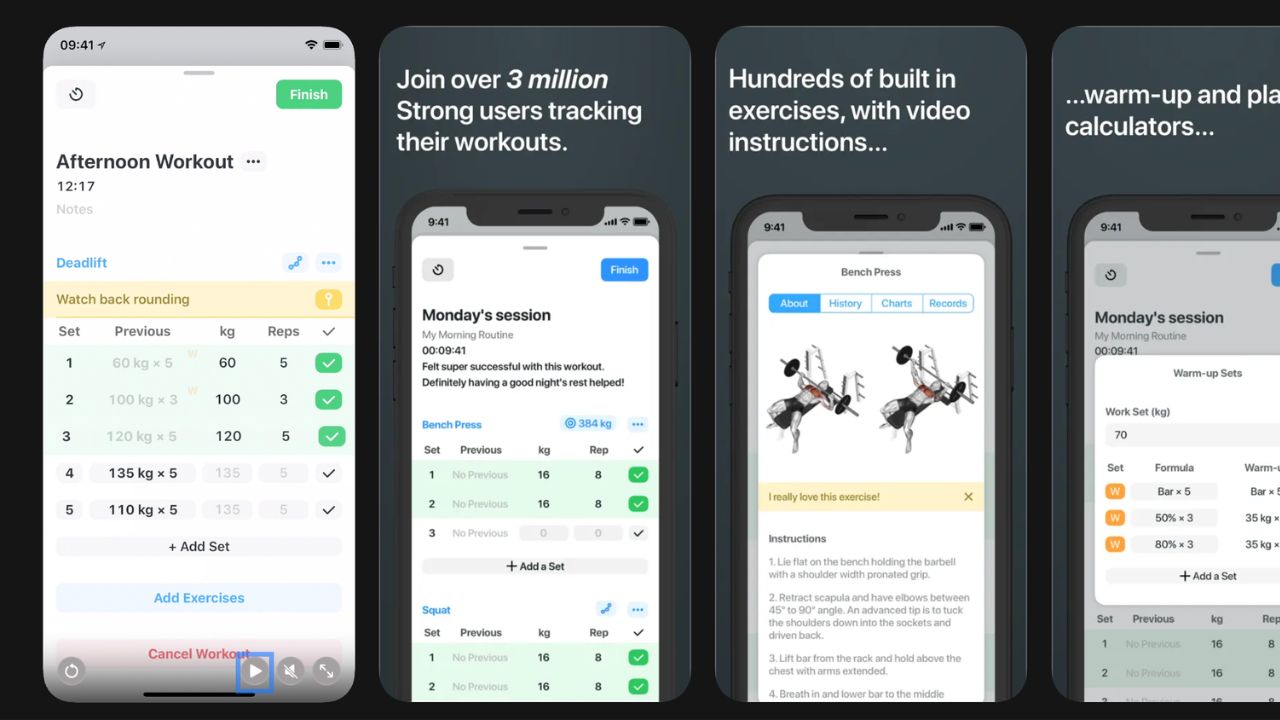
Strong is one of the most popular workout tracking apps and for good reason. The interface is clean, logging is fast, and it does not try to be more than what it is: a reliable place to record your lifts and track progress over time.
It is especially popular with intermediate and advanced lifters who already know what program they want to run and just need a no-nonsense tool to log sets, reps, and weight.
Best for: Experienced lifters who want fast, distraction-free workout logging.
Pros:
- Clean, minimal interface focused on logging speed
- Strong Apple Watch integration
- Solid progress charts and personal records tracking
- Supports custom routines and templates
Cons:
- Limited free version (restricted number of routines)
- No AI planning or auto-generated programs
- Exercise library is smaller compared to dedicated planning apps
Pricing: Free tier with limits. Pro subscription unlocks unlimited routines and additional features.
For a head-to-head breakdown, see our Load Muscle vs Strong comparison.
3. Hevy (Best Free Option)
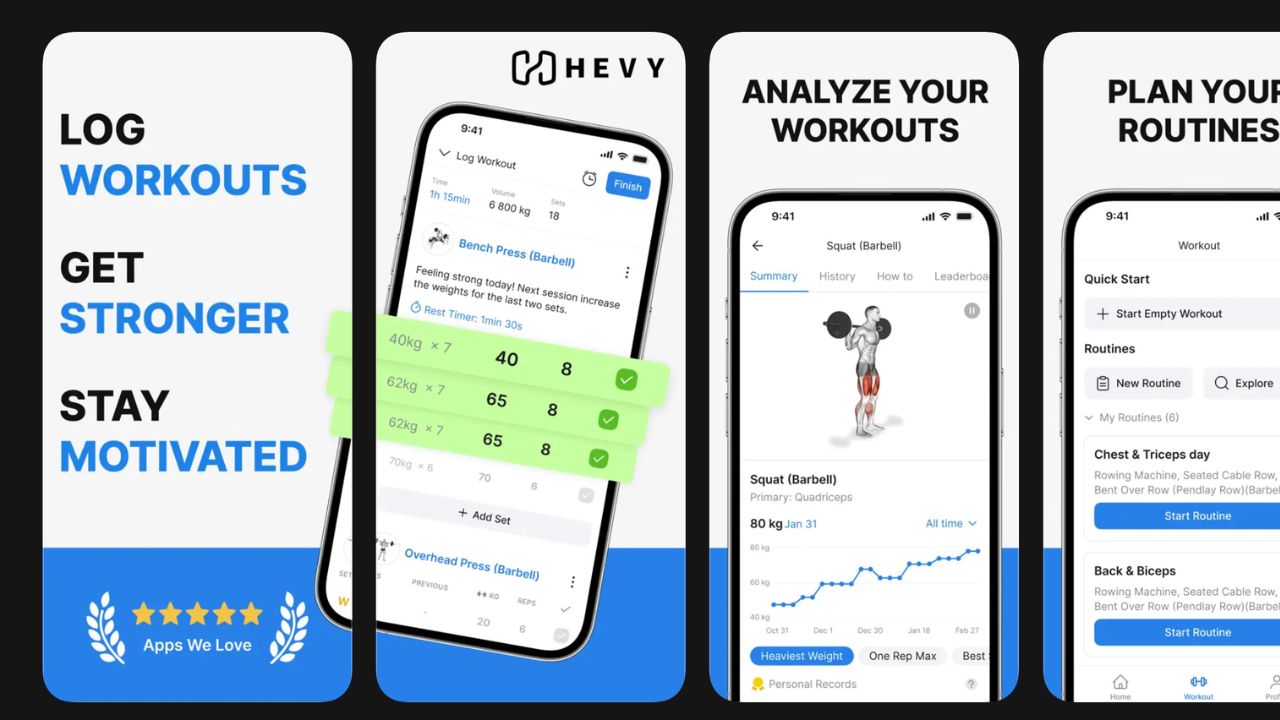
Hevy has gained a loyal following by offering a genuinely useful free workout app experience. The free tier includes workout logging, exercise tracking, progress graphs, and social features without aggressive upselling.
The app also has a community element where you can follow friends and share workouts, which adds a layer of accountability that some people find motivating.
Best for: Budget-conscious lifters who want solid tracking and a social community without paying.
Pros:
- Generous free plan with core tracking features included
- Social features for sharing workouts and following friends
- Clean interface with good routine management
- Active development with frequent updates
Cons:
- AI planning features are limited compared to dedicated planners
- Exercise library is decent but not as deep as specialized apps
- Some advanced features require the premium tier
Pricing: Free plan covers most needs. Premium available for power users.
Want to see how Hevy stacks up against Load Muscle? Read our detailed Load Muscle vs Hevy comparison.
4. JEFIT (Best for Bodybuilders)
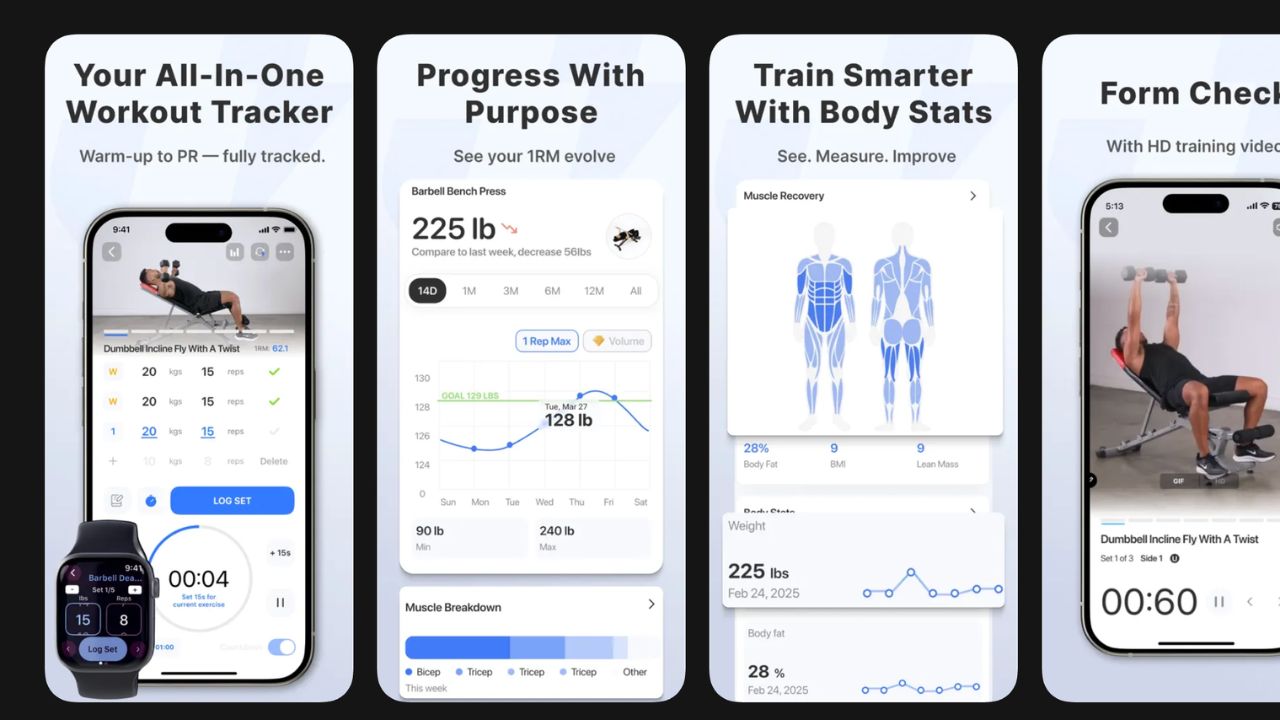
JEFIT has been around for years and has built one of the largest exercise databases available in a workout app. It is especially popular with bodybuilders who want detailed tracking for high-volume training and access to a wide range of isolation exercises.
The app also offers pre-built workout plans and a community where users share routines.
Best for: Bodybuilders and high-volume trainers who want detailed exercise tracking and a large exercise library.
Pros:
- Very large exercise database with animations
- Detailed tracking for sets, reps, rest times, and body measurements
- Pre-built plans and community-shared routines
- Long track record and established user base
Cons:
- Interface can feel dated compared to newer apps
- The free version includes ads
- AI and adaptive planning are limited
Pricing: Free with ads. Premium subscription removes ads and unlocks additional features.
For a closer look at how JEFIT compares, read our Load Muscle vs JEFIT comparison.
5. Fitbod (Best Adaptive AI)
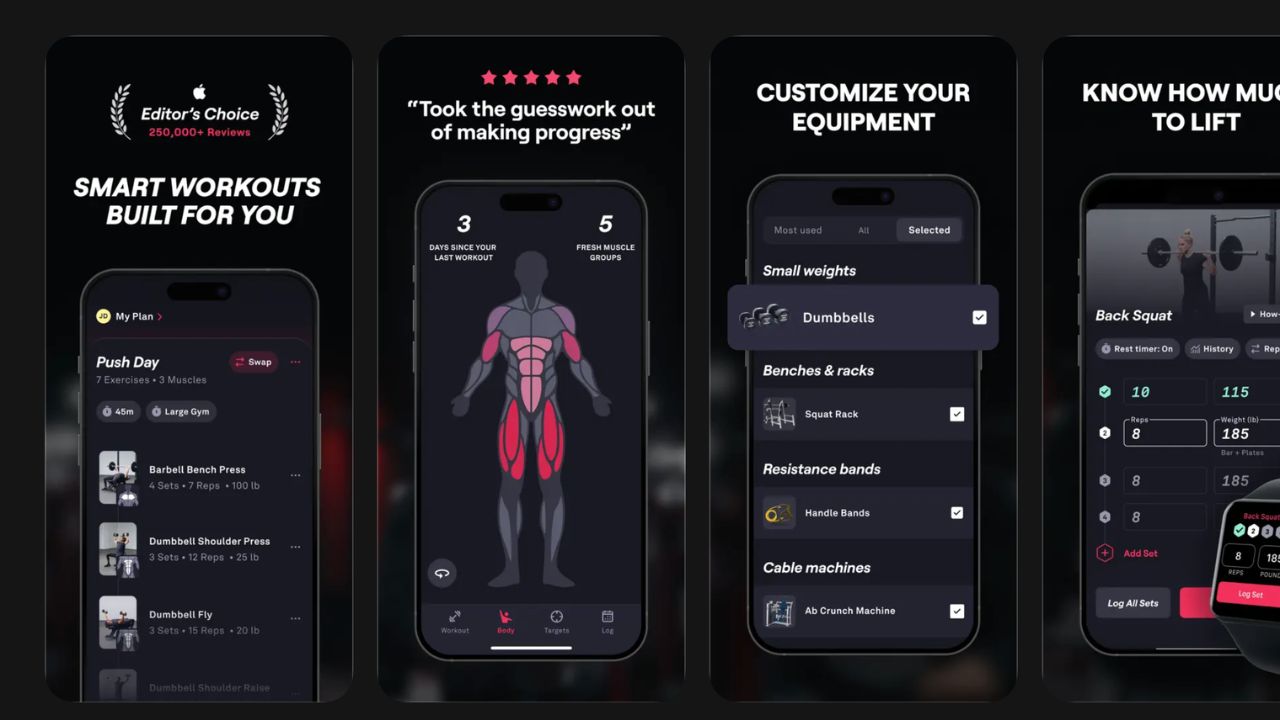
Fitbod focuses on adaptive workout generation. The app tracks your training history and uses that data to recommend exercises and adjust volume based on muscle recovery and recent activity. If you trained chest hard yesterday, Fitbod adjusts today's plan accordingly.
This approach works well for people who want variety and do not want to think too hard about programming.
Best for: Lifters who want the app to handle programming decisions and adjust automatically based on recent training.
Pros:
- Adaptive AI that adjusts workouts based on training history and muscle recovery
- Good exercise variety to prevent boredom
- Integrates with Apple Health and Apple Watch
- Clean, modern interface
Cons:
- Requires a paid subscription to unlock full functionality
- Less control over programming structure for advanced users
- The AI logic can sometimes feel unpredictable
Pricing: Limited free trial. Subscription required for ongoing use.
See how Fitbod compares in our Load Muscle vs Fitbod breakdown.
6. Nike Training Club (Best for Home Workouts)
Nike Training Club (NTC) is a solid choice if you primarily train at home and prefer guided, class-style workouts. The app offers a large library of video-led sessions across strength, endurance, yoga, and mobility.
It went through pricing changes over the years, but continues to be a popular option for people who want structured home training led by professional trainers.
Best for: Home trainers who prefer guided video workouts over self-programmed lifting.
Pros:
- Large library of guided video workouts
- Covers strength, cardio, yoga, and mobility
- Professional production quality
- Minimal equipment required for many sessions
Cons:
- Not ideal for traditional weight training or progressive overload tracking
- Limited customization compared to AI planners
- Workout logging is basic
Pricing: Offers free content. Premium tier available for full library access.
7. StrongLifts 5x5 (Best for Beginners)
StrongLifts 5x5 does one thing and does it well: it runs the classic 5x5 linear progression program. You squat, bench, row, overhead press, and deadlift. The app tells you exactly what weight to use and when to add more.
For complete beginners who just want to get strong with a proven barbell program, it is hard to beat the simplicity.
Best for: True beginners who want a simple, proven barbell strength program with zero decision-making.
Pros:
- Extremely simple to follow
- Automatic weight progression built in
- Great for learning the five core barbell lifts
- Free to start
Cons:
- Very limited to the 5x5 program structure
- Not suitable once you move past the beginner phase
- No variety in exercises or training styles
Pricing: Free basic version. Premium adds additional features and programs.
For more guidance on getting started as a beginner, see our best workout planner for beginners guide.
8. GZCL (Best for Powerlifting)
GZCL is not a single app but a popular training methodology created by powerlifter Cody Lefever. Several apps and spreadsheets support GZCL programming, and some dedicated GZCL apps exist that automate the tier system (T1, T2, T3 exercises).
The method structures workouts by priority: heavy compounds first, supplemental work second, and accessories third. It is a proven approach for intermediate and advanced lifters chasing strength PRs.
Best for: Intermediate to advanced lifters who want structured powerlifting programming with the GZCL methodology.
Pros:
- Proven periodization framework for strength gains
- Clear tier system makes programming logical
- Flexible enough to customize accessory work
- Strong community of experienced lifters
Cons:
- Steeper learning curve than simpler apps
- Dedicated app options are more limited than mainstream trackers
- Not designed for general fitness or home training
Pricing: Varies by app. Many GZCL tools and spreadsheets are free.
9. Gymshark Training (Best for Community)
Gymshark Training leverages the Gymshark brand's massive fitness community to offer workout plans, guided sessions, and social challenges. The app includes plans for various goals and experience levels, backed by Gymshark athletes and trainers.
If you are motivated by community challenges, brand identity, and structured plans from well-known fitness personalities, this app delivers on that front.
Best for: People who are motivated by community, challenges, and plans from popular fitness influencers.
Pros:
- Strong community and social challenge features
- Plans from well-known Gymshark athletes
- Covers gym and home workouts
- Engaging design and user experience
Cons:
- Less depth in AI planning or personalization
- Exercise library is not as large as specialized apps
- Heavily tied to the Gymshark brand ecosystem
Pricing: Free content available. Premium subscription for full access.
10. Apple Fitness+ (Best Ecosystem Integration)
Apple Fitness+ is the best option if you are fully invested in the Apple ecosystem. It integrates seamlessly with Apple Watch, iPhone, iPad, and Apple TV to deliver guided video workouts with real-time metrics displayed on screen.
The workout variety is strong, covering strength, HIIT, cycling, yoga, meditation, and more. The real-time heart rate and activity ring integration make it feel like a cohesive experience rather than a standalone app.
Best for: Apple device users who want guided workouts with deep hardware integration and real-time metrics.
Pros:
- Seamless Apple Watch and Apple TV integration
- Real-time heart rate and activity metrics during workouts
- Wide variety of workout types and durations
- High production quality with professional trainers
Cons:
- Requires Apple Watch for the full experience
- Not available on Android
- Limited strength training depth and progressive overload tracking
Pricing: Subscription-based. Often bundled with Apple One.
11. Caliber (Best for Strength Coaching)
Caliber combines workout tracking with an optional coaching layer. The app itself is a capable strength training tracker with built-in programs, and the premium tier connects you with a real human coach who reviews your logs and adjusts your plan.
For people who want something between a fully automated app and a traditional personal trainer, Caliber fills that gap.
Best for: Lifters who want data-driven tracking with access to human coaching feedback.
Pros:
- Solid workout tracking with progress analytics
- Optional human coaching layer for personalized guidance
- Well-designed strength training programs
- Good progress visualization and body composition tracking
Cons:
- Coaching tier is significantly more expensive than app-only competitors
- Smaller exercise library than dedicated planning apps
- Coaching availability depends on plan and scheduling
Pricing: Free app tier available. Premium coaching plans are priced higher than most app-only subscriptions.
Best Free Workout Apps in 2026
If you are on a budget or just starting out, you do not need to pay for a workout app. Several apps on this list offer free tiers that are genuinely useful, not just locked-down demos designed to push you toward a subscription.
Here are the best free workout apps worth downloading right now:
Hevy gives you the most complete free experience. Workout logging, exercise tracking, progress graphs, and social features are all included without paying. If you just need a reliable place to log sets and track progress, Hevy is hard to beat at zero cost.
Load Muscle offers a free plan that includes AI-generated workout planning and access to the full exercise library with 4,000+ exercises and video demos. The free workout planner lets you build a personalized program based on your goals and equipment without upgrading.
StrongLifts 5x5 is completely free for the basic 5x5 barbell program. If you are a beginner who just wants to squat, bench, and deadlift with automatic progression, this is all you need.
JEFIT offers a free tier with a large exercise library, though it includes ads. The tracking features are solid even on the free plan.
The honest answer is that a free workout app can absolutely be enough, especially if you are just getting started. Results come from consistency and progressive overload, not from premium subscriptions.
Best AI Fitness Apps in 2026
AI-powered workout apps have improved significantly in 2026. Instead of handing every user the same cookie-cutter plan, the best AI fitness apps now generate personalized routines based on your goals, equipment, schedule, and training history.
Here is how the top AI workout apps compare:
Load Muscle uses AI to build complete training plans from scratch. You answer questions about your experience level, available equipment, target muscle groups, and weekly schedule, and the AI generates a structured program drawing from 4,000+ exercises. The plans adapt to home or gym setups and update as your goals change. To learn how the AI builds your plan, read how the AI workout planner works.
Fitbod takes an adaptive approach. It tracks your workout history and uses muscle recovery data to recommend exercises and adjust volume. The AI responds to what you did yesterday rather than building a plan from scratch.
Caliber blends AI-driven programming with optional human coaching review, offering a middle ground between fully automated planning and traditional coaching.
Most other apps on this list (Strong, Hevy, JEFIT, StrongLifts) are primarily trackers and do not offer meaningful AI planning.
If you are wondering whether AI can truly replace a personal trainer, we cover that in detail: fitness app vs personal trainer and AI workout planner vs personal trainer.
Best Workout Tracking Apps
If your main priority is logging sets, reps, and weight quickly without distractions, these workout tracking apps are the strongest options:
Strong leads the category. The interface is optimized for speed: start a workout, tap to log each set, and move on. Apple Watch integration, progress charts, and personal records tracking make it a favorite among experienced lifters.
Hevy offers nearly the same tracking quality for free. You get workout logging, progress graphs, routine management, and social sharing. The premium tier adds extras, but the free version covers what most people need.
Load Muscle combines tracking with AI planning. You log your workouts and track progress, but the app also generates your program, which means you get planning and tracking in one place rather than needing separate tools.
JEFIT offers the most detailed tracking for bodybuilders. Sets, reps, rest times, body measurements, and a massive exercise database make it ideal for high-volume training where tracking every detail matters.
For people who already follow a specific program and just need a simple log, Strong or Hevy are the best picks. For people who want the app to also handle programming, Load Muscle or Fitbod make more sense.
Best Home Workout Apps
Training at home requires an app that works with limited equipment and does not assume you have a full gym. These apps handle home training best:
Nike Training Club is built for home workouts. The library is full of guided video sessions that require minimal or no equipment. Strength, cardio, yoga, and mobility sessions are all covered, and the production quality is high.
Load Muscle works well for home training because the AI planner adapts to whatever equipment you have. Whether you train with just a pair of dumbbells, resistance bands, or bodyweight only, the AI builds a program that fits. Browse the full exercise library filtered by equipment to see what is available.
Apple Fitness+ offers a wide range of guided home workouts if you are in the Apple ecosystem. Real-time metrics from Apple Watch add engagement, though the strength training depth is limited compared to dedicated lifting apps.
Gymshark Training covers both gym and home workouts with plans from Gymshark athletes. The community challenges can add motivation for home trainers who miss the social aspect of the gym.
If you train exclusively at home, explore our workout routines library for ready-made plans that work with various equipment setups.
LoadMuscle vs Strong vs Fitbod vs Hevy vs JEFIT
These five apps come up in almost every comparison search, so here is a direct head-to-head breakdown.
| Feature | Load Muscle | Strong | Fitbod | Hevy | JEFIT |
|---|---|---|---|---|---|
| AI Planning | Yes (full) | No | Yes (adaptive) | Limited | Limited |
| Exercise Library | 4,000+ | Moderate | Large | Moderate | Very Large |
| Workout Logging | Yes | Excellent | Yes | Good | Good |
| Progress Tracking | Yes | Excellent | Good | Good | Good |
| Free Plan | Yes | Limited | Trial only | Yes (generous) | Yes (ads) |
| Best For | AI planning | Tracking | Adaptive AI | Free tracking | Bodybuilding |
| Apple Watch | Coming soon | Excellent | Good | Good | Basic |
| Approx. Price | Free + Premium | ~$5/mo | ~$15/mo | Free + Premium | Free + ~$7/mo |
Choose Load Muscle if you want an AI to build your entire program based on your goals, equipment, and schedule. It has the largest exercise library on this list and the deepest personalization.
Choose Strong if you already have a program and just want the fastest, cleanest workout logger available. Apple Watch support is best-in-class.
Choose Fitbod if you want the app to auto-adjust your workouts based on muscle recovery and recent training history. It works best for people who want variety without thinking about programming.
Choose Hevy if you want the best free experience. Core tracking, progress graphs, and social features are all included at no cost.
Choose JEFIT if you are a bodybuilder who wants the largest exercise database and the most detailed volume tracking.
For detailed one-on-one comparisons, read:
Free vs Paid Workout Apps
The free vs paid question comes up constantly, and the honest answer is: a free workout app can absolutely be enough, especially if you are just getting started.
Here is when free works:
- You need basic workout logging and progress tracking
- You already know what program you want to run
- You are a beginner following a simple linear progression
Here is when paying makes sense:
- You want AI-generated plans tailored to your specific goals and equipment
- You need deeper analytics and long-term progress tracking
- You want offline access, Apple Watch integration, or other premium features
- You train seriously and the time saved by better tools is worth the cost
The good news is that most apps on this list offer free tiers or trials, so you can test before committing. Load Muscle, for example, gives you access to the free workout planner and a solid set of features without paying. If you are still deciding between an app and a traditional spreadsheet, our guide on workout planner app vs spreadsheet walks through the pros and cons of each.
Feature Comparison Table
| Feature | Load Muscle | Strong | Hevy | JEFIT | Fitbod | NTC | StrongLifts | GZCL | Gymshark | Fitness+ | Caliber |
|---|---|---|---|---|---|---|---|---|---|---|---|
| AI Planning | Yes | No | Limited | Limited | Yes | No | No | No | No | No | Limited |
| Exercise Library | 4,000+ | Moderate | Moderate | Very Large | Large | Large (video) | Minimal | Minimal | Moderate | Large (video) | Moderate |
| Workout Logging | Yes | Excellent | Good | Good | Yes | Basic | Yes | Varies | Basic | Basic | Good |
| Progress Tracking | Yes | Excellent | Good | Good | Good | Limited | Good | Varies | Limited | Good (rings) | Good |
| Free Plan | Yes | Limited | Yes | Yes (ads) | Trial only | Partial | Yes | Varies | Partial | No | Yes |
| Approx. Pricing | Free + Premium | ~$5/mo | Free + Premium | Free + ~$7/mo | ~$15/mo | Free + Premium | Free + Premium | Free/Varies | Free + Premium | ~$10/mo | Free + Coaching |
Note: Pricing is approximate and may vary by platform, region, or promotional offers. Always check the app's current pricing before subscribing.
Best Workout App by Goal
Different goals need different tools. Here is a quick guide.
Best for Beginners
StrongLifts 5x5 if you want a dead-simple barbell program with zero decisions.
Load Muscle if you want an AI-generated plan that matches your experience level, available equipment, and schedule. The free workout planner is a strong starting point.
For a full breakdown, read: Best Workout Planner for Beginners (2026).
Best for Muscle Gain
Load Muscle for AI-driven hypertrophy programming with 4,000+ exercises and built-in periodization.
JEFIT for detailed volume tracking and a massive exercise library if you prefer manual programming.
Fitbod if you want automated variety and muscle-recovery-based recommendations.
Browse ready-made hypertrophy routines in our workout routines library.
Best for Weight Loss
Apple Fitness+ if you want guided cardio and HIIT sessions with real-time metrics.
Nike Training Club for structured home workouts that combine strength and conditioning.
Load Muscle if you want a strength training plan designed around fat loss goals. Keeping muscle while losing fat requires proper programming, not just cardio.
Best Free Option
Hevy gives you the most complete free experience for workout tracking and community features.
Load Muscle offers a free plan with AI workout planning and access to the full exercise library with video demos.
StrongLifts 5x5 is completely free for the basic 5x5 program.
FAQ
What is the best free workout app in 2026?
Hevy is the best free workout app for pure tracking. It gives you workout logging, progress graphs, and social features without paying. Load Muscle is the best free option if you also want AI-generated workout plans. The free workout planner builds a personalized program based on your goals and equipment at no cost. StrongLifts 5x5 is the best free option for beginners who want a simple barbell strength program.
Are AI workout apps worth it?
Yes, if you value personalized programming. AI workout apps like Load Muscle and Fitbod generate routines tailored to your goals, equipment, schedule, and training history. This replaces the guesswork of building your own program and can rival what a mid-range personal trainer provides. The main advantage is time savings and consistency. Instead of spending hours researching programs, you get a structured plan in minutes. For a deeper look at how AI planning works, read our AI workout planner guide.
Which workout app is best for beginners?
StrongLifts 5x5 is the simplest option. It runs one program (5x5 barbell lifts) with automatic weight progression. No decisions required. Load Muscle is a better fit if you want more variety or train at home, since the AI adapts to your equipment and experience level. Read our full beginner workout planner guide for more details.
Can a workout app replace a personal trainer?
For programming and tracking, yes. A good AI workout planner can generate plans that rival what many trainers provide, at a fraction of the cost. But apps cannot assess your form in real time, and they cannot provide the accountability that comes from a scheduled session with another human. If you are a complete beginner, a few sessions with a trainer to learn proper form can be a smart investment alongside any app. We break down this comparison in detail in fitness app vs personal trainer. If you are wondering whether an AI planner can replace a personal trainer, we cover that specifically as well.
Is a free workout app enough to see real results?
Yes. Results come from consistent training, progressive overload, and recovery. A free app that lets you log workouts and track progress is enough to build a strong foundation. Premium features like AI planning and advanced analytics help, but they are not required, especially for beginners.
Do I need a separate tracking app and planning app?
Not necessarily. Some apps handle both well. Load Muscle, for example, combines AI workout planning with built-in tracking. But if you already follow a specific program (like GZCL or 5x5), a dedicated tracker like Strong or Hevy may be all you need.
What about Apple Watch integration?
If Apple Watch support is important to you, Strong, Fitbod, and Apple Fitness+ have the strongest integrations. Load Muscle and other apps offer varying levels of wearable support. Check each app's current compatibility before deciding.
Which workout app has the biggest exercise library?
JEFIT and Load Muscle both offer very large exercise libraries. Load Muscle includes 4,000+ exercises with video demonstrations, muscle targeting information, and equipment filtering. You can browse the full library at /exercises.
Should I switch apps if I am not seeing progress?
Probably not. If you are not seeing progress, the issue is almost always in your training consistency, nutrition, sleep, or programming, not the app itself. Before switching tools, check whether you are actually following a structured plan with progressive overload. If your current app does not support that, then consider switching to one that does.
Try Load Muscle Free
Finding the best workout app is only useful if you actually start training with it.
If you want a personalized plan built around your goals, schedule, and available equipment, Load Muscle's AI planner does the hard work for you. Choose from 4,000+ exercises, get a structured program, and track your progress in one place.
- Build your free plan now: Free Workout Planner
- Download the app: Get Load Muscle
- Browse exercises: Exercise Library
- Explore ready-made routines: Workout Routines
Stop comparing apps and start training. The best workout app in 2026 is the one that gets you in the gym consistently, and Load Muscle is built to do exactly that.